
Getting Started with UMUGANDA
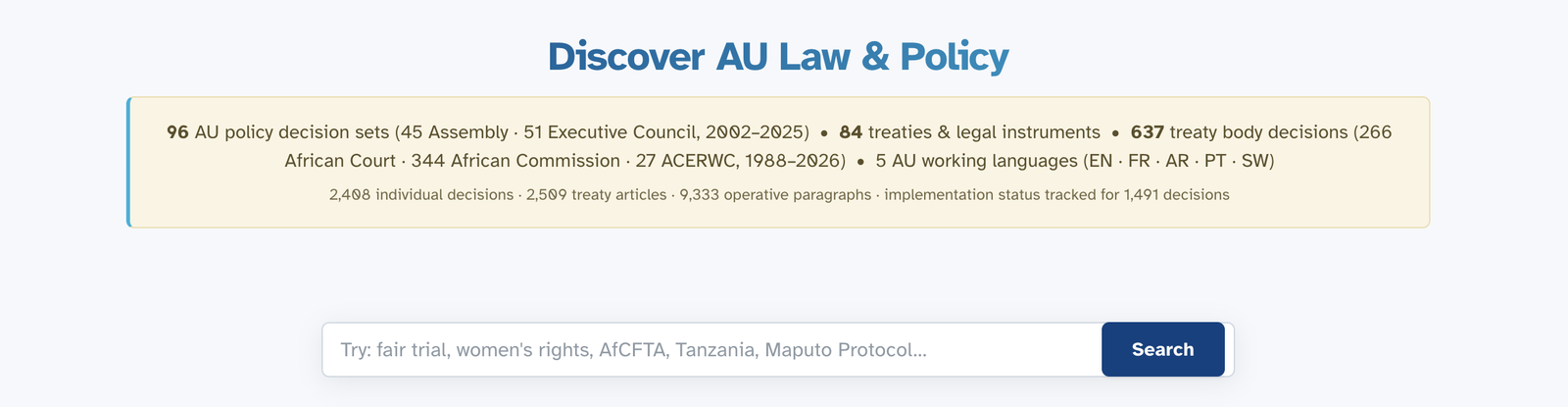
The Home page, also called Discover, is the starting point for search and exploration. Use the central search bar, switch language from the top-right buttons, and move between sections using the navigation tabs below the title.
What is UMUGANDA?
UMUGANDA (oo-moo-GAHN-dah) is a Kinyarwanda word meaning "coming together in common purpose". It is a free public legal intelligence platform that brings AU laws, treaties, court decisions and official commitments into one searchable space and shows how they relate.
UMUGANDA works as a map of African Union law. Instead of starting from many websites and PDF files, users can search available materials in one place and explore relationships between documents.
What makes UMUGANDA different?
What you can find here
| Type of material | What it is | How many |
|---|---|---|
| AU Policy Decisions | Official decisions of the Assembly of Heads of State and Government and the Executive Council, 2002–2025 | 96 decision sets containing 2,425 individual decisions |
| Court and Treaty Body Decisions | Decisions of the African Court, the African Commission and the ACERWC, 1988–2026 | 636 decisions |
| Treaties and Legal Instruments | Agreements between AU member states, with signature and ratification records | 79 instruments, searchable across 2,509 articles |
| Inside the decisions | The operative paragraphs where AU organs decide, request and commit | 8,512 operative paragraphs, with implementation status tracked for 1,502 decisions |
How the site is organised
At the top of every page, you will see these tabs:
| Tab | What it does |
|---|---|
| Home | The main page: search across available content types. This is also called the Discover page. Start here for broad searches. |
| AU Decisions | Focus on policy decisions, with tools to track implementation by country and see how actors connect |
| Union Laws | Browse treaties, see who has signed and ratified them, read article-by-article |
| Topics | Browse by subject: human rights, trade, governance, and more |
| Glossary | Definitions of legal terms used in AU documents |
| User Guide | This guide: how to use the site |
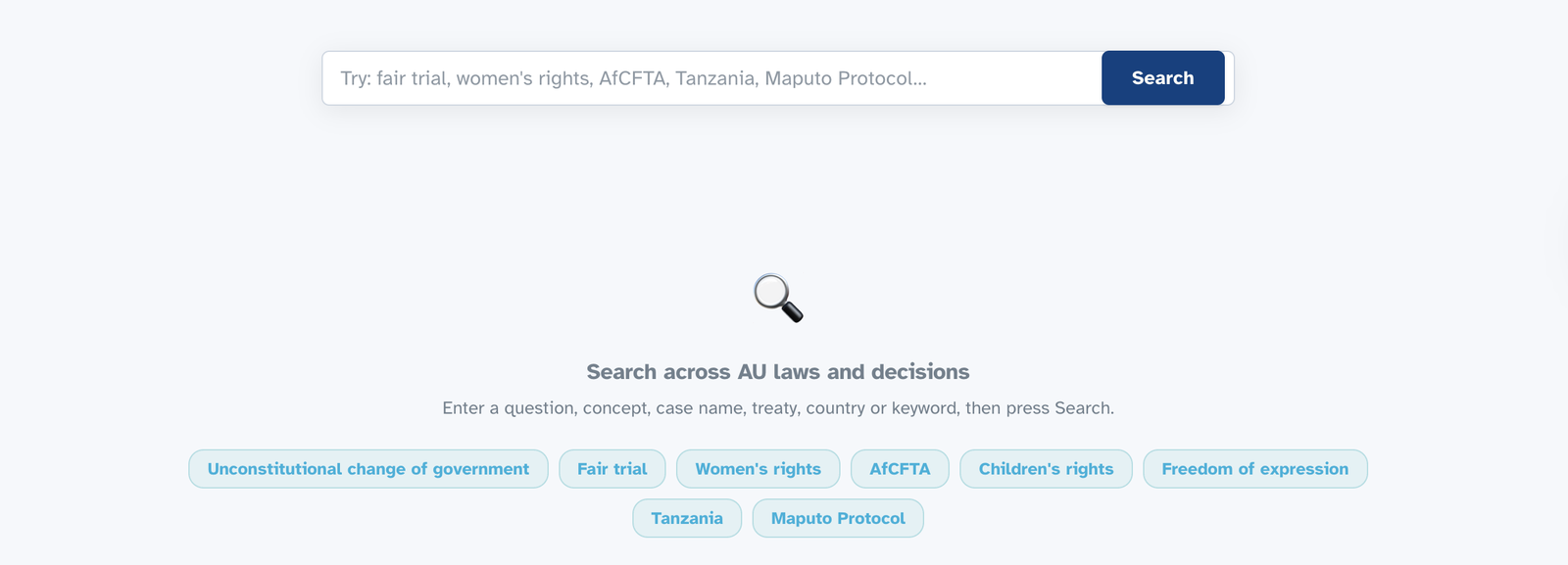
The Discover search bar on the Home page. As you type, suggestions appear. Topic buttons below offer quick access to common searches.
Choose Your Role
Different people use UMUGANDA for different reasons. On the Union Laws page you can tell UMUGANDA who you are, and it will present each law in the way most useful to you.
If you work with the law, choose one of the four roles. Lawyer: case law, precedents and citation-ready records. Judge: how provisions have been interpreted and applied. Academic: full texts, related literature and export formats for citation. Policymaker: obligations, deadlines and implementation status.
If you are a citizen, use "I am a citizen of" and select your country. You will see what your country has signed and ratified, in plain language: what each law means in practice, whether it applies to your country, and what your country has committed to do.

The role buttons and the citizen country selector on the Union Laws page.
How to Search
The Home Page Search: Your Starting Point
The Home page, also labelled Discover, has a single search box for available policy decisions, court cases and treaties.
- Go to the Home page: it opens by default when you visit UMUGANDA
- Type what you are looking for: a country name, a topic, a treaty name or a case name
- Choose from the suggestions that appear as you type, or click one of the topic buttons below the search box
- Press Search: your results will be grouped by type, and a panel lets you narrow them down
One search across everything, or a focused one
The Home page search looks across the whole database at once: policy decisions, treaties and their articles, and the decisions of the courts and treaty bodies. Results come back grouped by type, so you can see at a glance where the answer lives. When you already know which body of material you need, search within it instead. The AU Decisions tab searches policy decisions only, the Union Laws tab searches treaties article by article, and the court and treaty body decisions have their own search with the four methods described below. A broad search tells you where to look; a focused search takes you deeper.
One entry point, many ways in
If you prefer to choose your search method first, open Find what you need. It gathers every way of searching in one place: search everything, search within operative paragraphs, follow citation links between decisions, or browse by organ, session, year or theme. You can also ask the Research Assistant a question in plain language and receive an answer that cites the relevant AU documents. Under Targeted search you can look up records by official symbol, source document, organ, session or year.
Four Ways to Search Court and Treaty Body Decisions
When searching court and treaty body decisions, choose the search method that best matches your task. Each method is designed for a different type of query.
🔍 Simple Word Search
Type the exact words you are looking for. Best when you know the case name, communication number, or a specific term. Example: "Communication 266/03" or "death penalty Kenya"
🧠 Meaning Search
Type an idea or concept. The system finds documents about that topic even if they use different words. Example: "right to a fair hearing" also finds "fair trial" and "due process"
⚡ Combined Search
A mix of word search and meaning search. This is the recommended starting point for most research. Example: "land rights indigenous communities"
📖 Reference Search
Find documents that mention a specific case or treaty article. Example: search by a case number to find later cases that refer to it
Searching in Your Language
UMUGANDA works in five languages: English, French, Arabic, Portuguese and Kiswahili. Click the language buttons at the top of any page to change the website language.
When you search in your language, the system also looks for relevant documents in the other four languages. You do not need to search multiple times.

The language flags at the top of every page. When viewing a document available in multiple languages, a language bar lets you switch between versions.
Understanding Your Results
What each result tells you
| You will see | What it means |
|---|---|
| Title | The official name of the document |
| A short preview | A few lines from the document showing your search words in context |
| Which body produced it | The AU organ, court or committee that issued the document |
| Year | When it was adopted or decided |
| Country | Which country or countries it relates to |
| Document type | Whether it is a decision, judgment, treaty or other type |
| Why it appeared | Which part of your search matched this result |
Opening a document: what you will find
When you click on any result, it opens a detailed view. Here is what you will find:
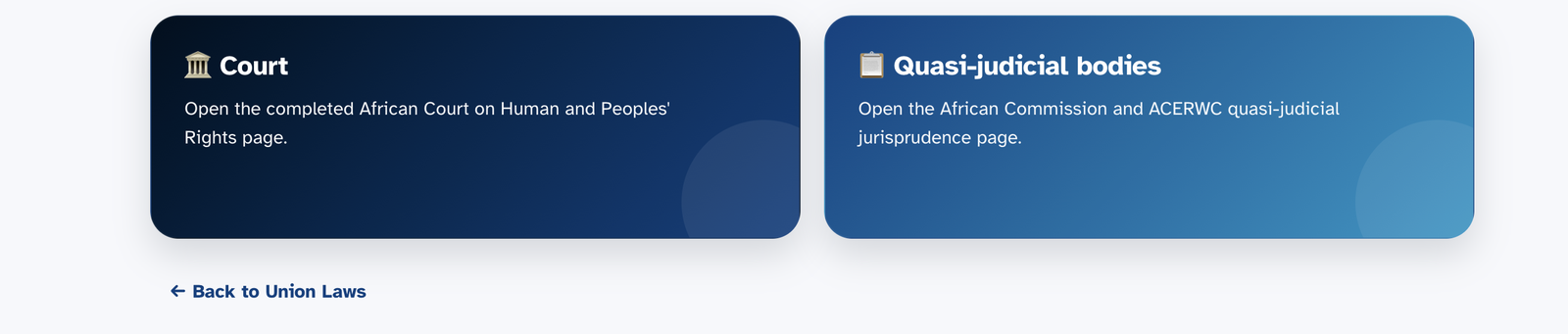
Some sections open up as you explore. Choosing Decisions of Treaty Bodies reveals two paths: the African Court, and the quasi-judicial bodies, namely the African Commission and the ACERWC.
Overview tab
Each record includes key details such as institution, case title, case number, country, date and decision type. It may also include a structured breakdown of the decision:
- What happened: the facts of the case
- What the body had to decide: the legal questions
- Why the body could hear the case: admissibility
- What the body decided and why: the reasoning
- The final decision: what was ruled
- What was ordered: the remedies or actions required
Similar Cases tab
Other decisions that are legally or factually similar, with an explanation of how they relate.
Compare tab
View two cases side by side to see what is the same and what is different.
Documents tab
Downloadable PDFs, official-source links and other available file formats.
Opening an AU policy decision
Policy decisions open with the full decision text and a summary of what was decided. Inside each decision you can see who must act, what they must do, deadlines, reporting duties and the themes the decision touches, drawn directly from the decision’s operative paragraphs.
Using filters to narrow your results
After you search, a panel on the left side of the screen lets you narrow down your results by:
- Type of document: show only policy decisions or only court decisions
- Year: show results from a specific year
- Institution: show only results from the African Court, African Commission or a specific AU organ
Taking your results with you
Any set of results, and most individual documents, can be exported: PDF or Word for reading and sharing, CSV or Excel for analysis, JSON for reuse, and RIS for reference managers such as Zotero and EndNote. A citation option gives you a properly formatted reference for any record.
AU Decisions in Depth
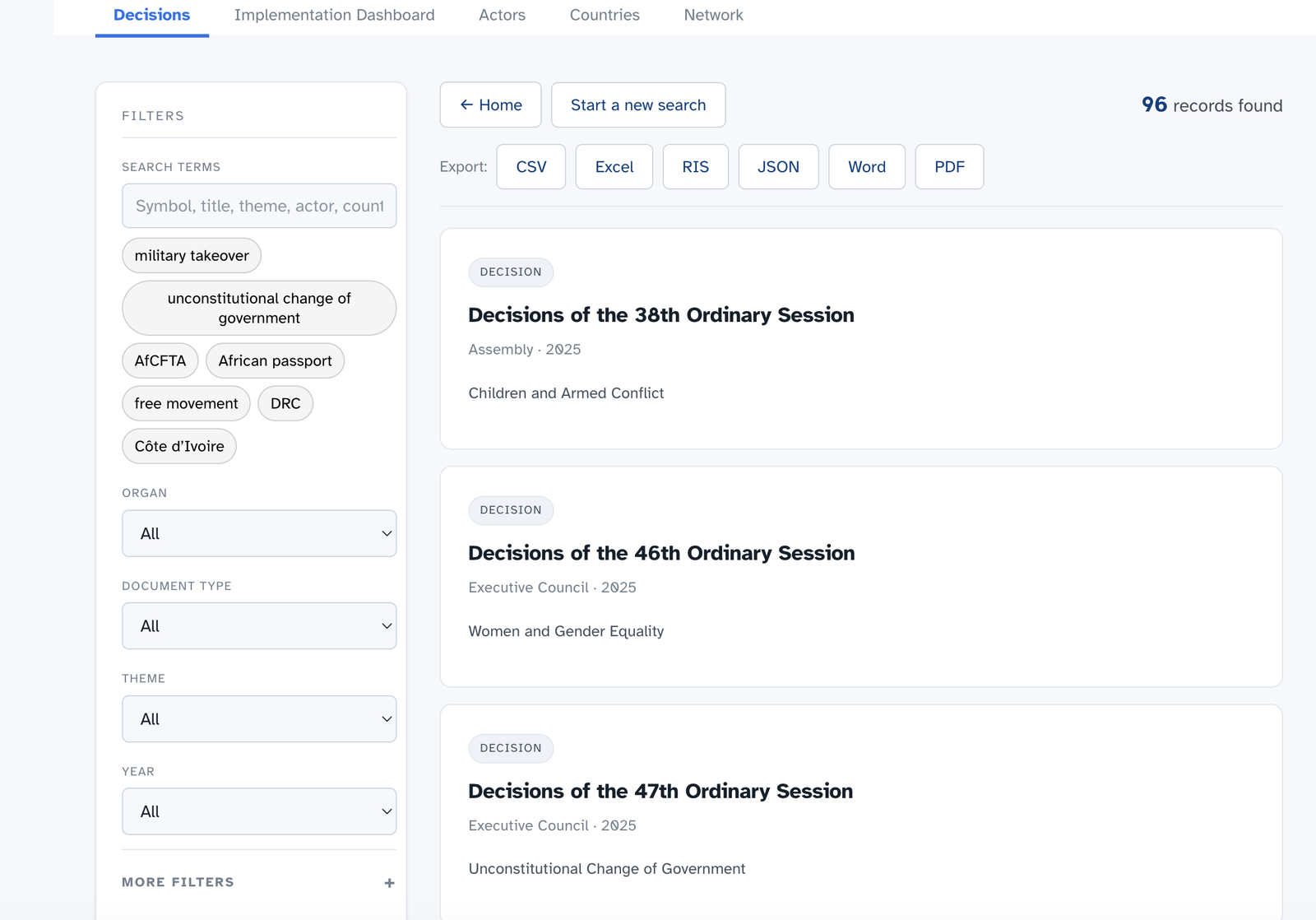
The AU Decisions tab. After a search, results are grouped by type, and the panel on the left lets you filter by year, institution and document type.
The AU Decisions tab holds the policy decisions of the Assembly and the Executive Council, and a set of tools for following what happens after a decision is adopted.
Decisions. Browse or search the 96 consolidated session records, 2002–2025, containing 2,425 individual decisions. Each record shows the full decision text, a summary, and who must act on what, by when.
Implementation Dashboard. A public overview of how AU decisions are followed up in the official documentary record. It draws on 96 consolidated session records of the Assembly and the Executive Council covering 2002 to 2025, and tracks the substantive decisions taken in those sessions. Routine items such as budgets, elections and meeting logistics are excluded unless they set new standards.
A decision's status is derived exclusively from the text of later AU decisions. Where a subsequent decision textually records implementation, progress or reiteration, that passage is captured as evidence. Where no such mention exists, the status reads 'No record of implementation in AU policy organ decisions'. This is a statement about the documentary record, not a finding that a decision was or was not implemented.
Use the summary cards for coverage at a glance and the theme bars to compare documentary follow-up across policy areas. Selecting any decision shows the verbatim excerpts on which its status rests.
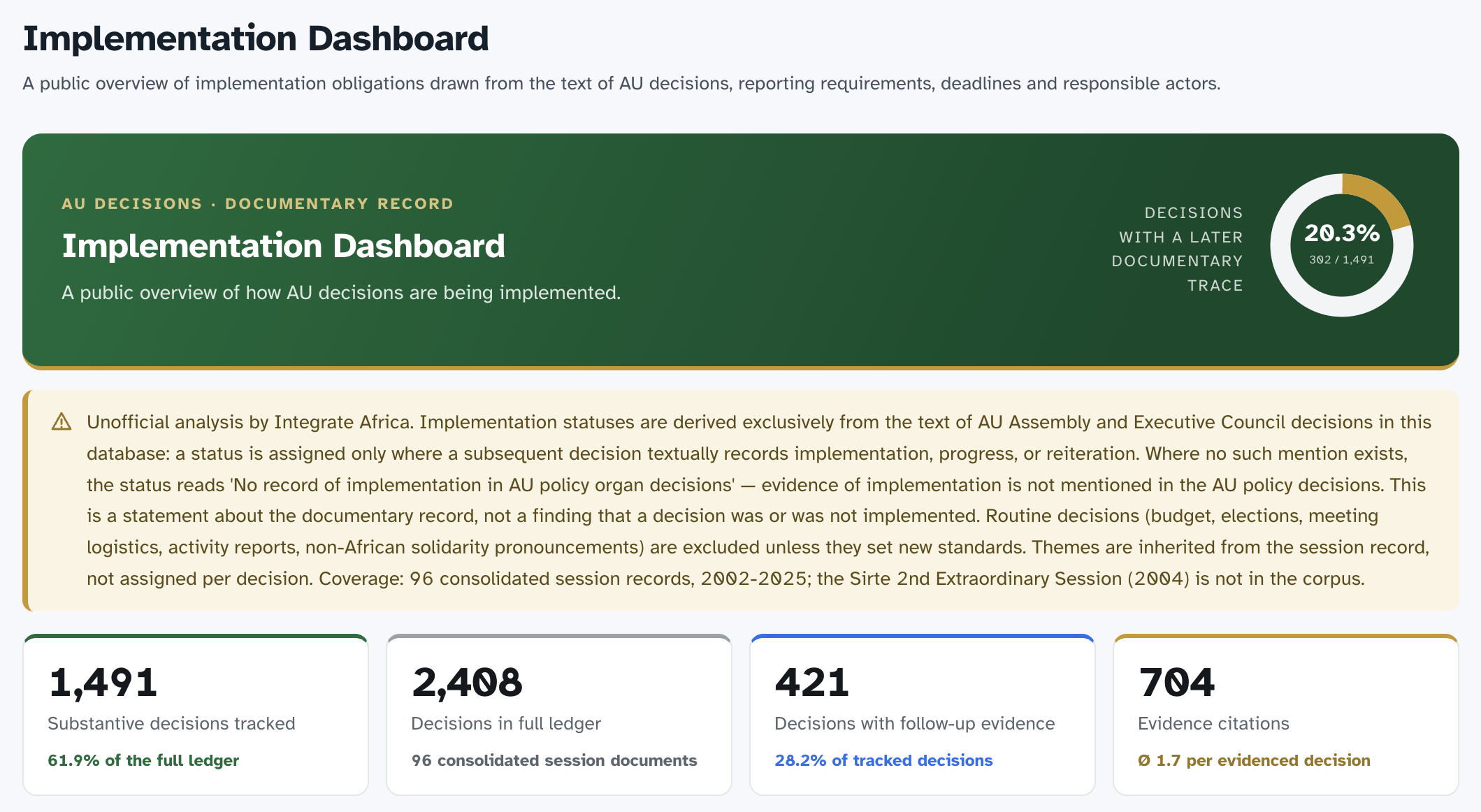
The Implementation Dashboard, showing the overall documentary trace and summary statistics.
Actors. The registry of everyone AU decisions call upon: organs, member states, regional economic communities, agencies and partners. Each actor’s obligations are gathered in one place: what they have been asked to do, in which decisions, with what deadlines.
Countries. Country profiles bringing together each member state’s treaty commitments, the decisions that concern it, and its reporting obligations.
Network. The connections between actors and decisions, shown as an explorable map of who is linked to what.
Treaties and Your Country
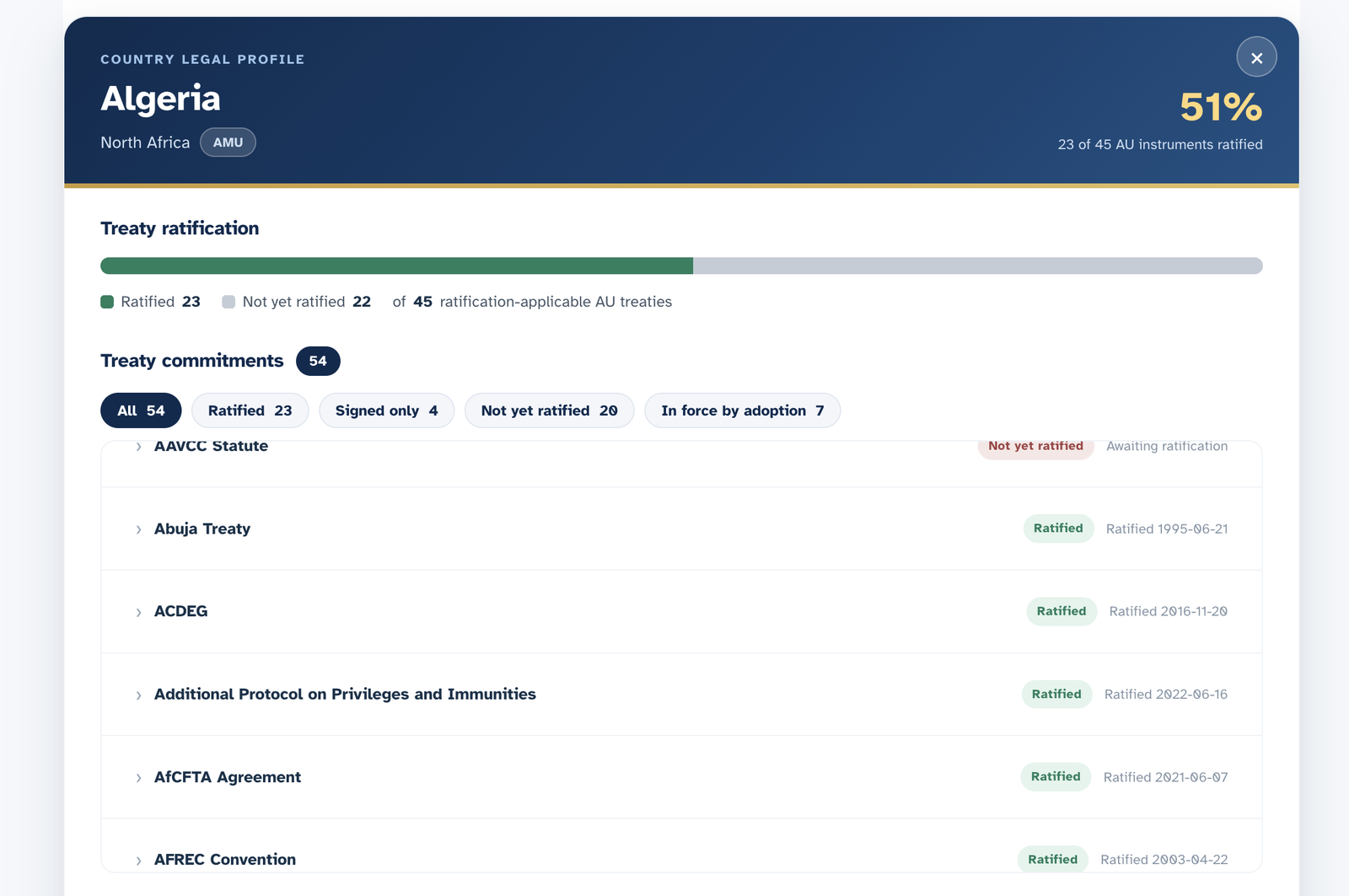
Each country has a legal profile. It shows how many AU treaties the country has ratified, the status of each treaty commitment, and the cases involving that country.
Finding information about a treaty
Go to the Union Laws tab to browse and search all AU treaties. Click any treaty to see:
- The full treaty text: divided into articles for easy reading
- An interactive map: showing which countries have ratified (green) and which have not (grey)
- A detailed table: listing every country's status: signed, ratified or not yet joined
- Reservations: statements by countries explaining which parts of the treaty they will not be bound by
- Related court decisions: cases that have interpreted this treaty
The AU Treaties tools
Within Union Laws, six sections let you work with the treaties at any depth.
Search Articles: search every article of every AU treaty. Look up a specific article, browse a treaty’s articles, see what is linked to an article, or find exact wording.
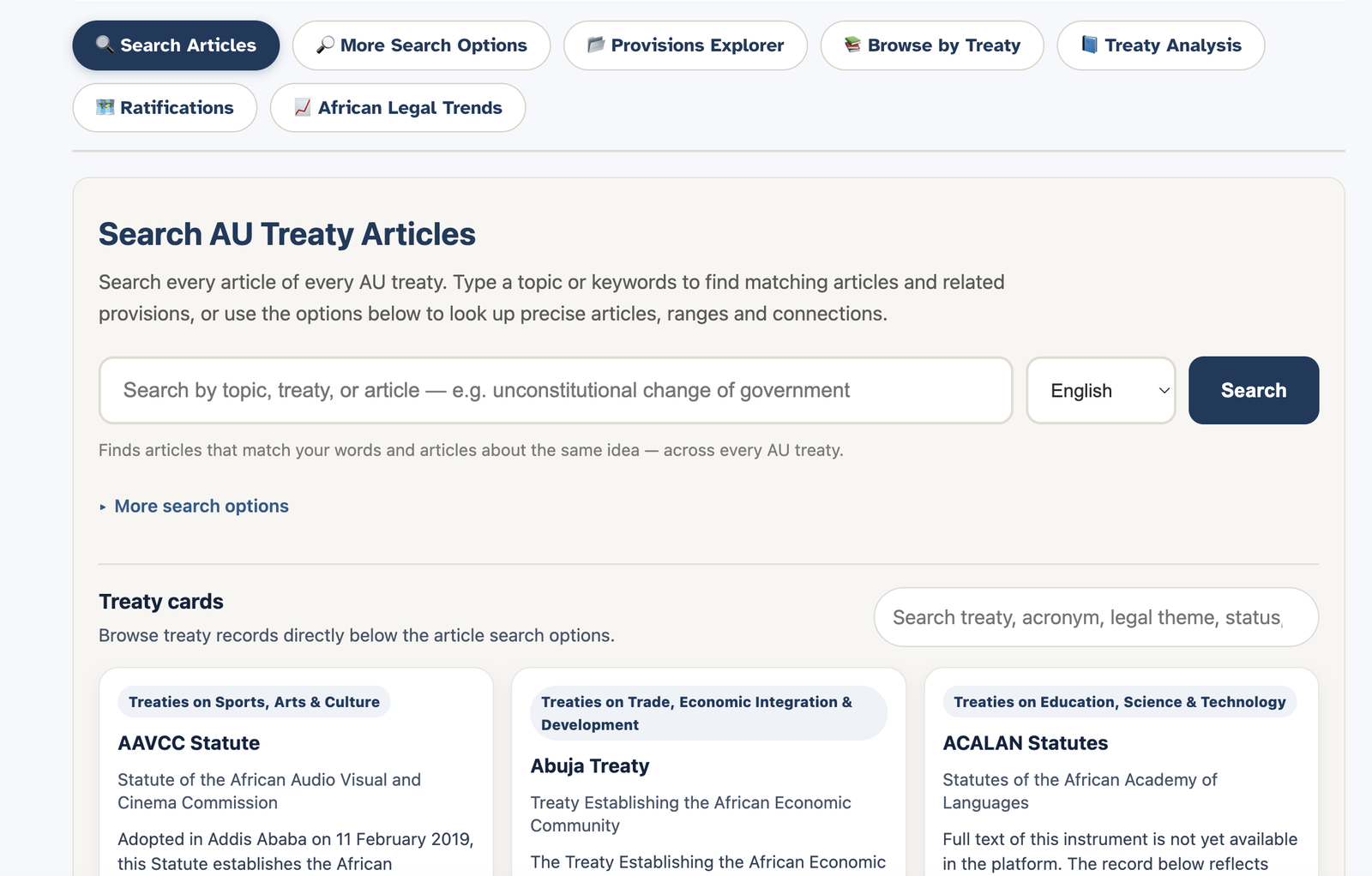
The Search AU Treaty Articles page.
Provisions Explorer: move through the treaties by theme and topic to compare how different instruments treat the same subject. Browse by Treaty: the full collection, organised under the African Union’s own treaty categories, from the Constitutive Act to the newest protocols. Treaty Analysis: a treaty-by-treaty view combining overview, articles, ratification and related literature. Ratifications: who has signed, ratified and deposited, treaty by treaty and country by country, with an interactive map. African Legal Trends: the wider picture of how ratification has moved over time, country by country and category by category, using the AU’s own treaty categories.
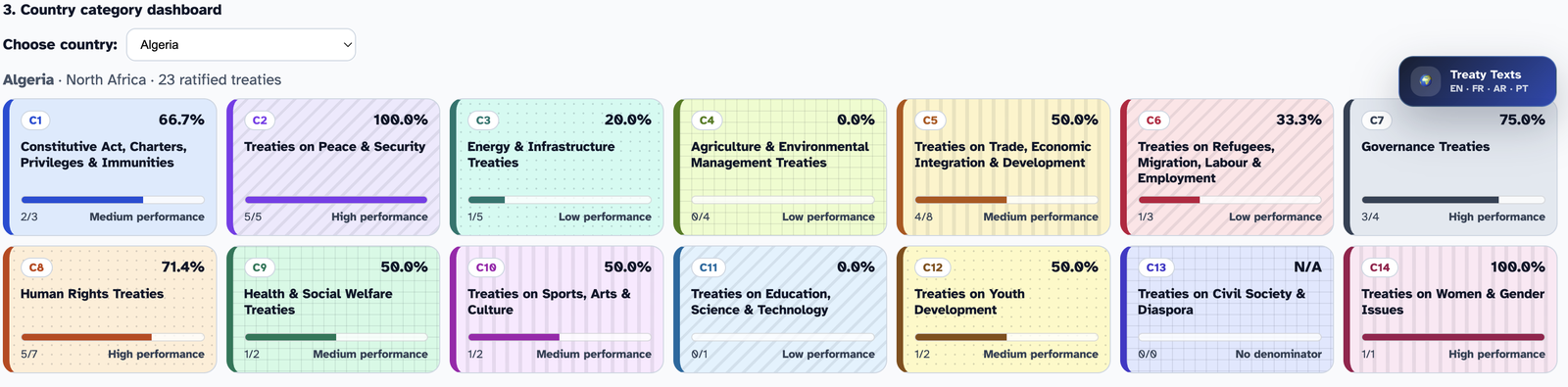
The country category dashboard shows ratification levels across the AU’s own treaty categories, so you can see where a country’s commitments are strong and where gaps remain.
What you can learn about your country
A country profile in UMUGANDA provides key information at a glance:
Example: What a country card shows
It shows treaty commitments, cases involving the country, and upcoming reporting deadlines.
Understanding ratification
Ratification is the process by which a country formally agrees to be bound by a treaty. Here is how it works:
- Signature: the country signs the treaty, showing it intends to join. Signature alone does not create legal obligations.
- Ratification: the country completes its internal legal process (often through parliament) and formally agrees to be bound.
- Deposit: the country deposits its ratification document with the African Union. The treaty now applies to that country.
Extra Materials That Help Explain the Law
Laws and court decisions do not exist in isolation. UMUGANDA includes additional materials that help you understand the full picture. You will find them in the Guidance section and linked from treaty and topic pages.
What kind of extra materials?
Soft law and guidance documents
Soft law refers to documents that are not legally binding but carry weight and influence how binding laws are understood. These include:
- General Comments: official explanations by treaty bodies of what specific treaty articles mean
- Guidelines and principles: frameworks adopted by AU bodies to guide countries on specific issues
- Model laws: template legislation that countries can adapt for their own legal systems
- Declarations and resolutions: political commitments that may influence future binding laws
Academic and expert materials
For many treaties, UMUGANDA includes links to:
- Academic articles and books: scholarly analysis of AU law
- Reports and commentaries: expert explanations of what treaties and decisions mean in practice
- Official AU reports: progress reports, state party reports and other official documents
How we organise extra materials
Extra materials are linked to relevant treaties and topics. Treaty pages may include related literature and supplementary documents. Topic pages may include curated collections of binding laws, court decisions and explanatory materials.
How This Database Uses Artificial Intelligence
UMUGANDA uses artificial intelligence (AI) to support search, translation, summarisation and document discovery. AI-assisted content can improve access to AU legal materials, but should be read with the linked official sources.
Our Approach to AI
AI is a research-support tool, not a legal authority. It may help organise, summarise or connect materials, but human review and official source verification remain essential.
- Search: semantic search helps find documents that address the same topic even when they use different words. For example, a search for "unlawful change of government" may also surface materials on "unconstitutional change of government" or "military takeover".
- Translation: AI may assist with translation workflows, but official language versions and human-reviewed translations should be preferred for formal legal use.
- Summaries: AI may help prepare structured summaries that make long decisions easier to navigate, but summaries should be checked against the original document.
- AI operates within the database environment and should be understood as a tool for organising, searching and explaining existing materials.
- AI-assisted summaries and translations are linked to source materials so users can compare them with the original documents.
- AI does not make legal decisions or provide legal advice. It helps users find and read documents; legal interpretation remains the user's responsibility.
- UMUGANDA progressively reviews, corrects and improves AI-assisted summaries, translations and metadata.
- Summaries are prepared from official texts with AI assistance and editorially reviewed by Integrate Africa.
- The goal is a database where human legal expertise remains the final standard, supported by AI efficiency.
- AI can make mistakes. It may miss nuance in legal language or produce summaries that are incomplete.
- AI-assisted translation is not a substitute for official or professionally reviewed legal translation.
- For court cases, formal legal submissions, academic publications or official work, verify the original official document and use human-reviewed translations or summaries where available.
Why UMUGANDA Exists
UMUGANDA exists to serve the institutions whose documents it carries, not to compete with them. The AU, the African Court, the African Commission and the ACERWC maintain the authoritative platforms for their own documents, and every record here points back to them. What UMUGANDA modestly adds is the connective layer: one search across all of these sources, the relationships between documents made visible, plain-language summaries alongside the official texts, and five working languages throughout. If UMUGANDA does its work well, users end up reading more of the official sources, not fewer.
Great databases already exist
Official AU, African Court, African Commission and other institutional platforms already provide authoritative legal documents. UMUGANDA does not replace them; it complements them.
How UMUGANDA complements existing databases
Official AU platforms remain the authoritative repositories for source documents. UMUGANDA complements them with search, connections, summaries and accessibility tools.
| Capability | Official AU sources provide | UMUGANDA adds |
|---|---|---|
| Search across available sources | Authoritative documents on each official platform | One search across available policy decisions, court cases and treaties |
| See connections | Official documents as published by each body | Shows relationships between treaties, decisions and cases where links have been identified |
| Track implementation | The decisions themselves, as issued | Follow-up tools: see which countries are implementing decisions and meeting deadlines |
| Search in your language | Documents in the languages in which they were produced | Five AU working languages, with the ability to search in one language and find results in others |
| Understand complex decisions | Full official texts: often lengthy and detailed | Plain-language structured summaries breaking down facts, issues, reasoning and outcome |
| Country-specific information | Documents organised by source institution | Country profiles bringing together all treaty commitments, pending reports and relevant cases for each member state |
| Extra explanatory materials | Legal texts and decisions | Academic literature, soft law and guidance documents linked directly to the treaties and topics they explain |
| Cost | Some services or databases may require paid subscriptions | Free for users |
The value UMUGANDA adds
Official AU, court and institutional platforms remain the authoritative sources for original documents. UMUGANDA links to them directly and adds connection and understanding by helping users see relationships between materials and read plain-language explanations.
Help and Frequently Asked Questions
Is UMUGANDA free?
Yes. UMUGANDA is a free public service. You do not need to create an account, log in or pay anything to search and read documents.
Are all the documents here official?
Yes. The legal documents available in UMUGANDA are official documents of the African Union, its organs, courts, treaty bodies and competent mechanisms. UMUGANDA organises and facilitates access to those documents. For formal legal, academic or institutional use, cite the underlying official document and verify the linked official source where available.
Can I use what I find here in my work?
For academic work, court documents, reports, journalism or other formal use, cite the underlying official document whenever it is available. You may also cite UMUGANDA as the database used to locate, search or analyse the document, but UMUGANDA does not replace the official source.
How are the summaries prepared?
Summaries are prepared from the official texts with AI assistance and editorially reviewed by Integrate Africa. They are designed to make long documents easier to navigate; for formal use, always rely on the official text itself. See the "AI and This Database" section for more detail.
Why are some documents not available in my language?
AU materials may be available in several official languages. Availability varies by document. New language versions are added as they become available. When multiple versions exist, a language bar lets you switch between them.
How often is the database updated?
Regularly, as new decisions are published and new documents are processed. The numbers on the Home page show how many documents are currently available.
Can I suggest a document to be added?
Yes. Use the feedback option in the database or email info@afrikamoja.africa. We welcome suggestions for official AU documents that should be included.
What if I cannot find what I am looking for?
- Try shorter, more general search terms
- Try searching in a different language
- Switch to Meaning Search if you are using Simple Word Search
- Clear any filters you have applied
- Check whether the document falls within our current coverage dates
How do I download or export a document?
When viewing a document, look for download options. Where available, documents may be provided as PDF, Word (DOCX) or reference-manager formats such as RIS.
How do I report a problem?
Email info@afrikamoja.africa with the page address, what you were trying to do, what happened and what you expected.
Is there a way to access UMUGANDA programmatically?
Yes. UMUGANDA provides an API — a way for computer programs to access the data. Email info@afrikamoja.africa for documentation and access details.